Page 1 of 1
Can someone post a screenshot of their CP setup?
Posted: Sat Jul 23, 2011 12:19 pm
by iwanta170
Can someone who thinks they have a good CP setup please post it? It would be very helpful. Thanks.
Re: Can someone post a screenshot of their Circus Ponies setup?
Posted: Sat Jul 23, 2011 2:13 pm
by abudaba
It takes a while to figure out what works for you but this was my setup that got me top 10%, LR, and a transfer from T3 to T1:
--ImageRemoved-- (LinkRemoved)
During class I would have 3 windows up. My notes on the left, case briefs in the center, and outline on the right.
The window on the left shows how my notes and other materials were organized. They are separated by week. I have a separate section for outlines, case briefs, and other exam prep materials.
Sample of my notes:
--ImageRemoved-- (LinkRemoved)
On the left are my notes from early in law school. On the right are notes from the end of the last semester. As I started to have a better idea of what was relevant, I was able to organize things in outline form. Outline form makes outlining the course easier in the end as you might suspect. Early on it may not be entirely clear to you how the material should be organized but practice makes perfect.
Freestanding Sample of Case Briefs:
--ImageRemoved-- (LinkRemoved)
Anything more in depth than this is overkill imo. A case is in the casebook for a certain reason. If you can identify that reason then why waste time typing up everything else which is essentially fluff. One important distinction: the "fluff" is not entirely irrelevant. You must understand and follow it as you are reading because this is what will lead you to the crux of the case. However, once that becomes clear, the only thing you need to carry on is the central point so take note and move on.
Freestanding sample of my outline:
--ImageRemoved-- (LinkRemoved)
Re: Can someone post a screenshot of their Circus Ponies setup?
Posted: Sat Jul 23, 2011 2:37 pm
by iwanta170
Thanks! If only TLS had some sort of "rep" feature for good posts.. I'll take a closer look later today.
Re: Can someone post a screenshot of their Circus Ponies setup?
Posted: Sun Jul 24, 2011 9:22 pm
by abudaba
Appreciate that. Anyway, hope it helps and gl

Re: Can someone post a screenshot of their CP setup?
Posted: Sat Jul 30, 2011 11:11 am
by LadyIrish
This is super helpful! I'm a new CP user and am sloooowly getting acquainted. I had often thought about how to best setup a notebook for each class. One question . . . I noticed you had one page just for a short, concise summaries of the cases - did you find it helpful to link to the briefs, or do you do any linking at all? I'm still getting the hang of it and am wondering if it's worthwhile to setup links.
Also, is there any chance you would consider creating a template for newbies like myself to work off as a starting point? Please?

Re: Can someone post a screenshot of their CP setup?
Posted: Sat Jul 30, 2011 1:13 pm
by abudaba
If you want a template you can pm me your email and I'll send you one. Otherwise if you have a suggestion for somewhere I can upload the file, I can do that too (its 1.2mb which is too big for the sites I looked into).
Otherwise, no, I never used links and am not familiar with them so I cant really comment on their utility. Sorry.
Re: Can someone post a screenshot of their CP setup?
Posted: Sat Jul 30, 2011 8:11 pm
by salvage
I'm going to send you a PM for the template if you don't mind. I am just getting acquainted with CP too, and trying to set up helpful notebooks for 1L.
Re: Can someone post a screenshot of their CP setup?
Posted: Sat Jul 30, 2011 11:45 pm
by theturkeyisfat
What is CP?
Re: Can someone post a screenshot of their CP setup?
Posted: Sat Jul 30, 2011 11:52 pm
by merc280
theturkeyisfat wrote:What is CP?
Circus Ponies-note taking software for macs.
Re: Can someone post a screenshot of their CP setup?
Posted: Wed Aug 10, 2011 12:00 am
by TR Fan
Thanks Abudaba, much appreciated! I just installed CP and gave it a run using your template. Looks pretty handy, I look forward to using it.
Re: Can someone post a screenshot of their CP setup?
Posted: Wed Aug 10, 2011 12:27 am
by missinglink
TR Fan wrote:Thanks Abudaba, much appreciated! I just installed CP and gave it a run using your template. Looks pretty handy, I look forward to using it.
+1.
Re: Can someone post a screenshot of their CP setup?
Posted: Wed Aug 10, 2011 10:27 pm
by abudaba
Np. I remember first setting up a system that I liked took me way too many hours early on. I hope this will save some of you a bit of time
Re: Can someone post a screenshot of their CP setup?
Posted: Thu Aug 11, 2011 4:03 am
by bb8900
Hi,
I am basically completely struggling to figure out how to use CP.
I basically want to do what some of the posters did above: I want to have three notebooks per course. One notebook for class notes, one for briefs, and one to create outlines.
I can't figure out how, in the contents menu, to create the upside down triangles or the bullet points?
For the class notes I want the tabs on the side to just say week 1, week 2, etc.
For the briefs I want the sides tabs to say week 1, week 2, etc, but to also have a bullet point under the upside triangle that actually says the name of the case.
Does anyone have any clue how to do any of this?
Thanks
Re: Can someone post a screenshot of their CP setup?
Posted: Thu Aug 11, 2011 9:11 am
by 03121202698008
When I used CP, I used the Cornell format and typed my notes as I read on one side and any in-class additions on the other adjacent. Second semester I gave up and just straight outlined in Word. It made making my end of course outline much much easier.
Re: Can someone post a screenshot of their CP setup?
Posted: Thu Aug 11, 2011 1:01 pm
by bb8900
I am almost thinking of doing that bc Word for Mac 2011 is pretty tight
Re: Can someone post a screenshot of their CP setup?
Posted: Tue Aug 16, 2011 9:27 pm
by WonkyPanda
what would you say is the key differences between CP notebook and Word 2011?
Re: Can someone post a screenshot of their CP setup?
Posted: Tue Aug 23, 2011 1:24 pm
by blurped
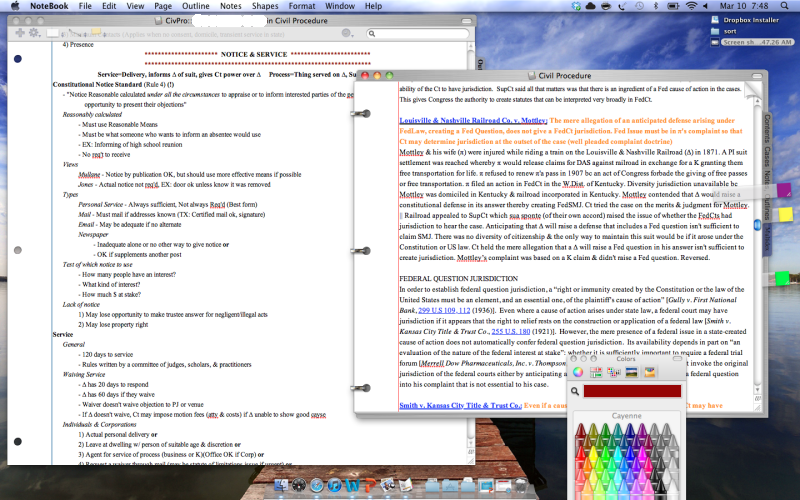
Here is a screenshot of my Circus Ponies note-taking page from CivPro.
I keep 3 documents open that help me effectively compile/regurgitate a large amount of information during class: 1) a former students outline (not pictured), 2) my outline, & 3) a list of case briefs compiled from the web. I've found it very helpful to have multiple CP windows open at one time.
This CP setup is tweaked & customized to have a uniform look, feel, & structure. I was initially concerned that CP would be unsightly, since the only online screenshots I found were from the default notebook. Fortunately, you can customize the settings to give the notebook a clean & professional appearance.
Re: Can someone post a screenshot of their CP setup?
Posted: Tue Aug 23, 2011 1:32 pm
by blurped
bb8900 wrote:Hi,
I am basically completely struggling to figure out how to use CP.
I basically want to do what some of the posters did above: I want to have three notebooks per course. One notebook for class notes, one for briefs, and one to create outlines.
I can't figure out how, in the contents menu, to create the upside down triangles or the bullet points?
For the class notes I want the tabs on the side to just say week 1, week 2, etc.
For the briefs I want the sides tabs to say week 1, week 2, etc, but to also have a bullet point under the upside triangle that actually says the name of the case.
Does anyone have any clue how to do any of this?
Thanks
Go to Page/Page inspector. Pull the small pane over to the side of the window--it can be used to customize each page. Click on a page that you want to have a tab. Then, glance over at the page inspector and choose the icon that looks like a notebook page (the one with 3 holes). Go to the section labeled 'Tab' If you want the page to have a tab, click 'Has a Tab'.
I pretty much just fooled around with each of these functions until I had a notebook template that I liked, which I use with each class. CP is a great program, but its intuitiveness is limited. It takes a lot of personal trial & error to figure out how to use it. However, if you go to
http://www.circusponies.com, there is a discussion forum under the help section. You can do a search & many questions will be answered already. If they are not, email CP--they usually respond within 1-2 days & are VERY helpful. Plus, they are extremely responsive to user requests/criticism. FYI, they will want you to attach your notebook if the question doesn't have a straightforward answer.